
XrmToolBox设置用户默认时区
183 字
1 分钟
XrmToolBox设置用户默认时区
- 1XrmToolBox导出实体数据字典
- 2XrmToolBox设置用户默认时区本文
- 3解决XrmToolBox启动时报NuGet程序集加载失败
详细步骤
详细步骤如下
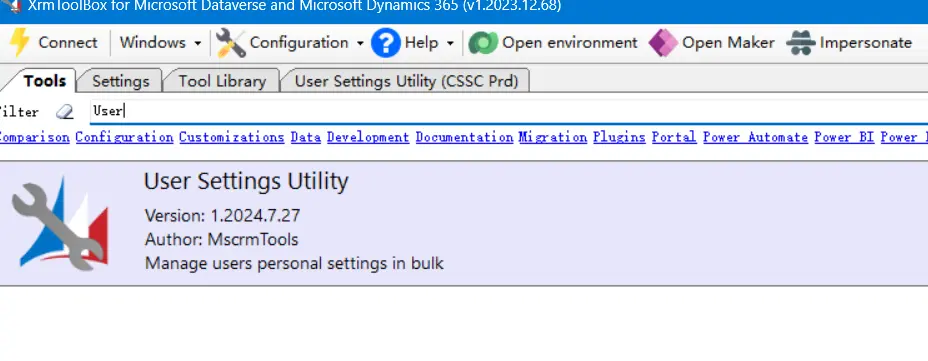
Step #1 XrmToolBox 安装并打开 User Settings Utility
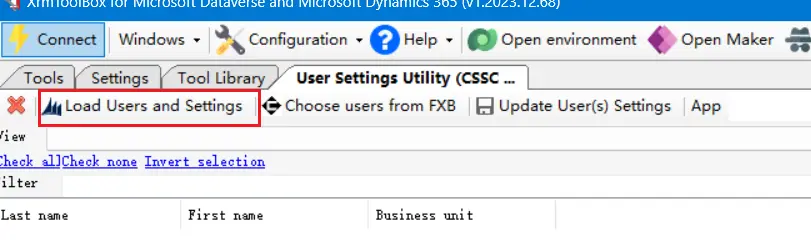
Step #2 加载用户信息
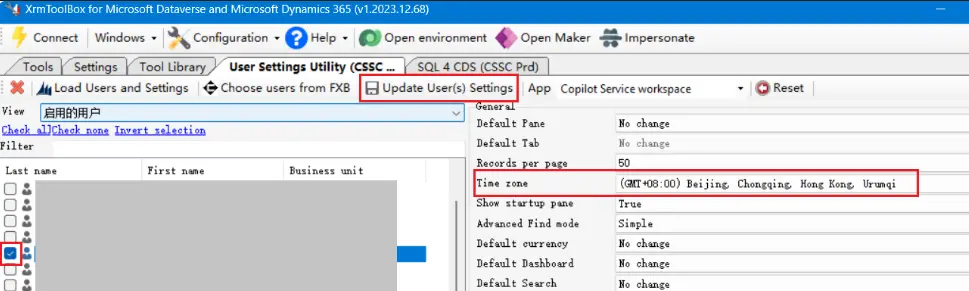
Step #3 选择并勾选用户,选择时区,最后点击更新用户设置
通过SQL查询用户目前使用的时区
另外,还可以通过下面的SQL查询用户目前使用的时区:
SELECT s.fullname AS UserName, s.businessunitidname AS BusinessUnit, s.domainname AS Domain, us.timezonecode AS TimeZoneCode, tz.standardname AS TimeZoneNameFROM systemuser AS s INNER JOIN usersettings AS us ON s.systemuserid = us.systemuserid INNER JOIN timezonedefinition AS tz ON us.timezonecode = tz.timezonecodeWHERE s.isdisabled = 0;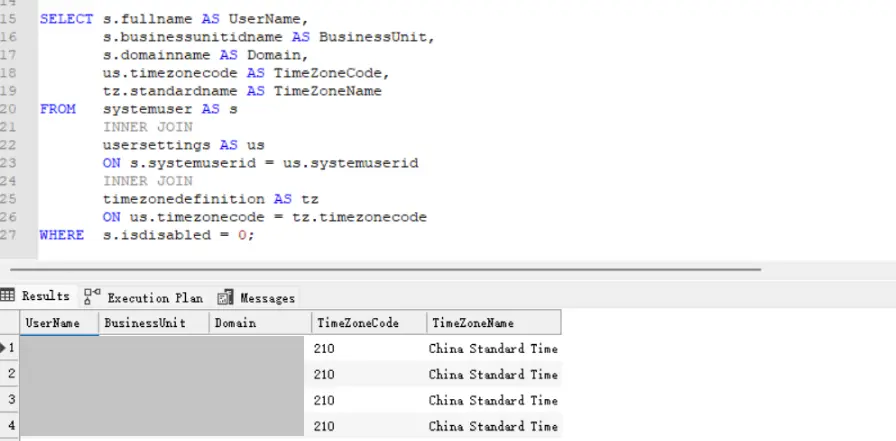
SQL字段说明
| # | Field | Description |
|---|---|---|
| 1 | UserName | Full name of the user. |
| 2 | BusinessUnit | The business unit to which the user belongs. |
| 3 | Domain | The user’s domain account (e.g., contoso\johndoe). |
| 4 | TimeZoneCode | The numeric code that represents the time zone in Dynamics 365. |
| 5 | TimeZoneName | The standard name of the time zone (e.g., Pacific Standard Time). |
支持与分享
如果这篇文章对你有帮助,欢迎分享给更多人或打赏支持!
XrmToolBox设置用户默认时区
https://mgrowup.com/posts/dynamics365/set-default-time-zone-for-user/相关文章智能推荐
1
XrmToolBox导出安全角色表级权限到Excel
Dynamics 365使用XrmToolBox的Role Documenter插件,将Dynamics 365安全角色的表权限快速导出Excel
2
解决XrmToolBox启动时报NuGet程序集加载失败
Dynamics 365记录一次 XrmToolBox 启动时报 NuGet.Protocol、NuGet.Versioning 等程序集加载失败的排查过程,最终通过清理并重建插件目录解决问题,适合遇到类似启动错误的 D365 使用者参考
3
使用DBeaver连接Dynamics 365 Dataverse
Dynamics 365在数据分析或开发工作中,有时我们希望能用熟悉的SQL工具直接查询Dataverse中的数据,除了使用SSMS、SQL 4 CDS外,还可以使用DBeaver,下文详细记录了配置过程。
4
Dynamics 365 事件框架、事件执行管道
Dynamics 365Dynamics 365 插件运行的“流水线”到底长什么样?
5
C# 技术备忘 - LINQ
CsharpLINQ是C#进阶的必经之路,它能让你用声明式的方式操作数据,代码会变得非常简洁优雅
随机文章随机推荐
评论区
欢迎来到我的博客!这是一则示例公告。
文章
62
分类
9
标签
37
总字数
76,949
运行时长
0 天
最后活动
0 天前
站点域名mgrowup.com
Fireflyv6.16.5
Astrov7.2.4
Nodev24.19.0
pnpmv11.22.0
构建时间2026年8月29日 22:57:52
系统信息Linux / x86_64