
在实施 Dynamics 365 项目时,经常有用户要求当某些单据的状态发生变化,需要给用户消息提醒,像这种情况,我一般是先使用In-App Notification,因为它相较于邮件或Teams,配置起来也更快捷!接下来我将使用三种方式(Flow、API、C#)为用户创建“消息提醒”
Table of contents
Open Table of contents
前言
本文示例场景:当 Account 的负责人(Owner)发生变更时,向新负责人发送应用内通知
效果展示
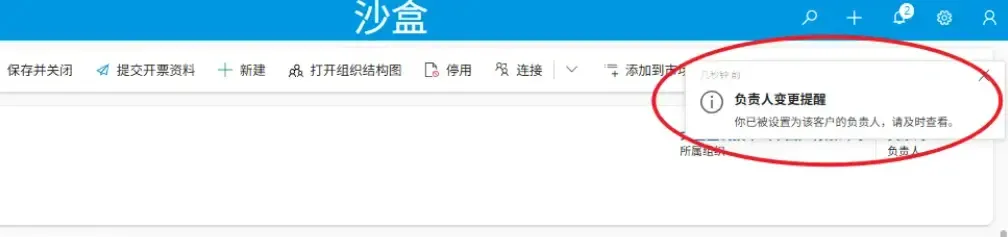
前置条件:启用应用内消息通知功能
在使用 In-App Notification 之前,需要先在应用层级启用该功能,否则后续代码或Flow都无法生效,启用功能很简单,下面是启用步骤
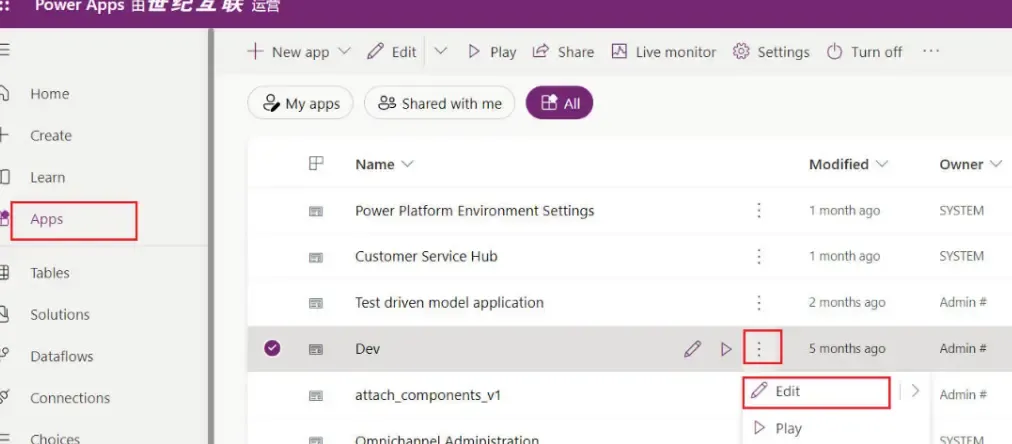
(1) 打开 Power Apps
(2) 点击菜单栏中的 App
(3) 选择目标应用
(4) 点击“三个点”
(5) 选择“编辑”(Edit)
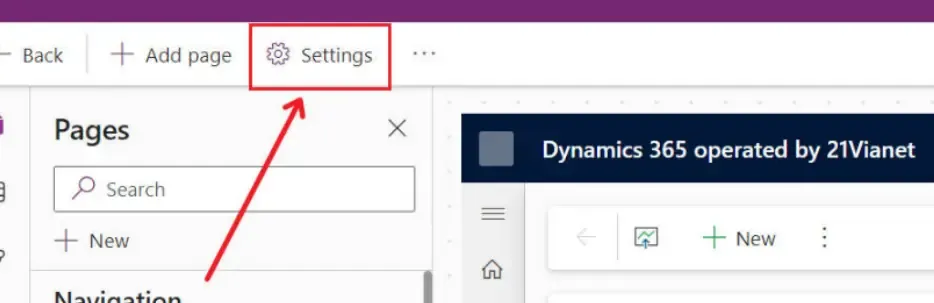
(6) 在应用编辑页面顶部,点击 Settings 按钮
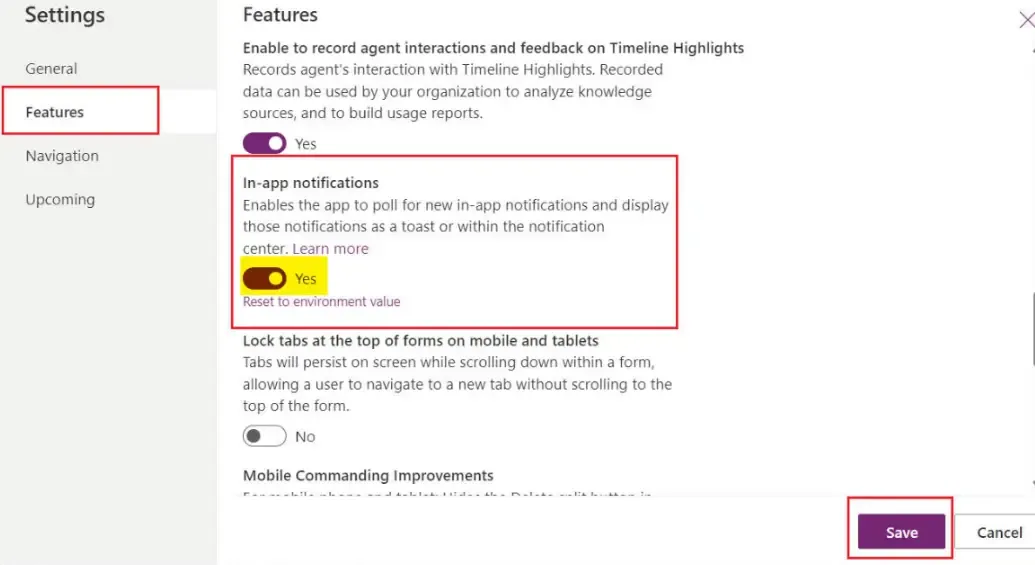
(7) 切换到 Features 选项卡,启用 In App Notification,并保存设置。
TIP
启用成功后,可以在 Dataverse 表列表中看到新增的 Notification(appnotification) 表,这也是后续所有通知的基础
推送方式一:Cloud Flow(低代码)
TIP
如果团队偏向低代码,或者通知逻辑简单的话,我推荐使用 Cloud Flow 创建消息提醒
Step 1. 新建 Cloud Flow
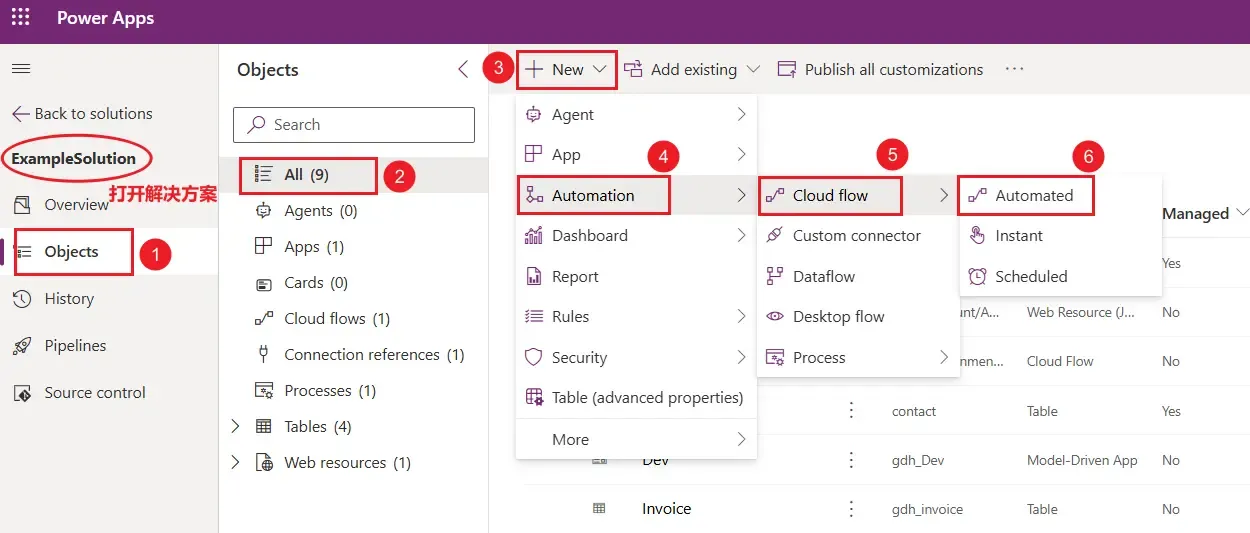
打开 Power Apps → 打开解决方案 → 左侧菜单栏选择 “Object” → 然后选择 “All” → 点击 “+New” → 点击 “Automation” → 点击 “Cloud flow” → 点击 “Automated”
Step 2. 配置 Cloud Flow
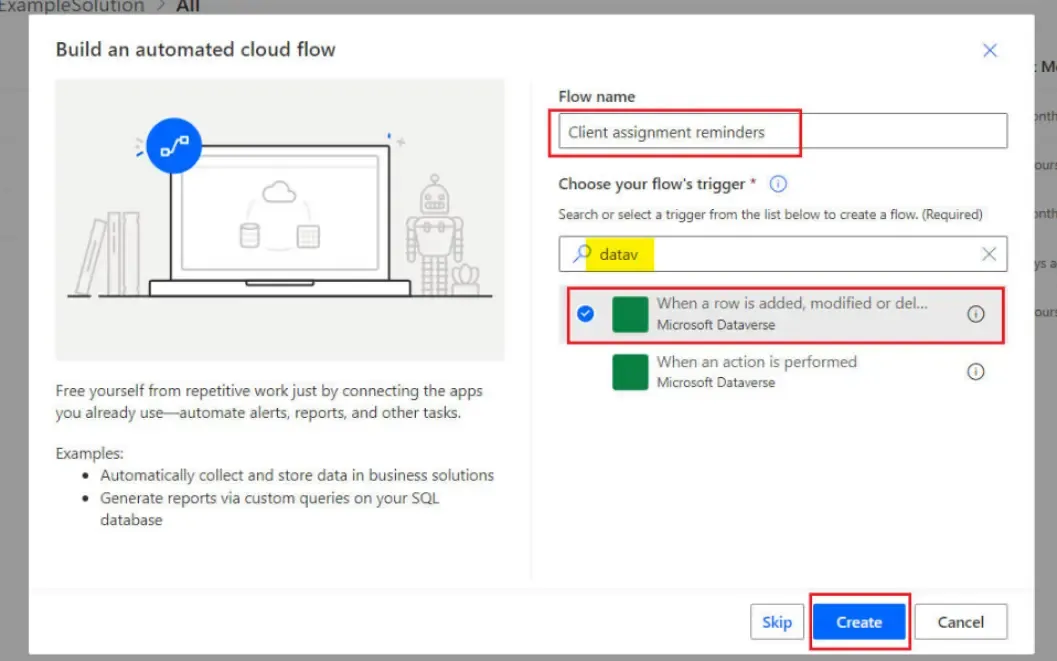
在弹出的新建 Cloud flow 页面输入一个有意义的名称,然后通过模糊搜索(输入 Dataverse),选择触发器:When a row is added, modified or deleted,最后点击 Create
Step 3. 配置触发器
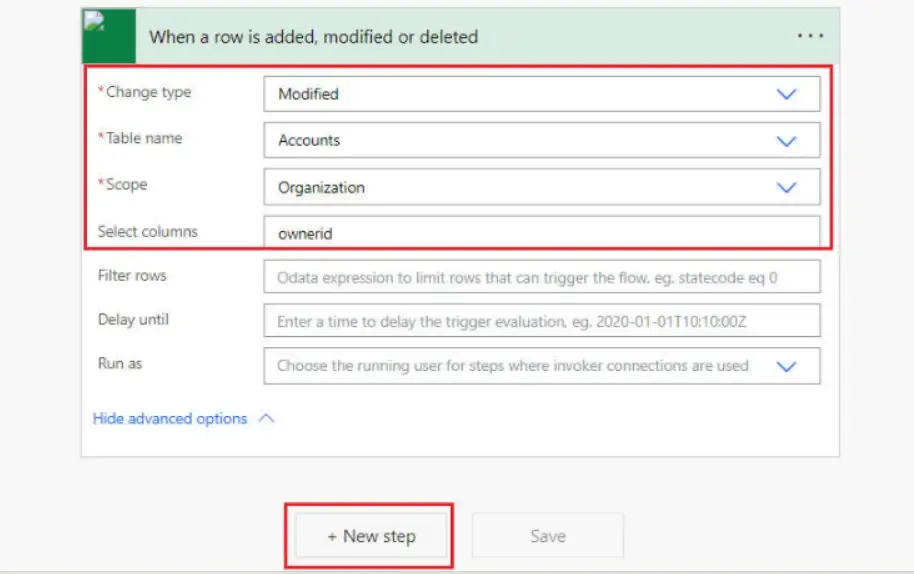
在 Flow 设计器中,配置 When a row is added, modified or deleted 触发器,然后点击 “+ New step” 继续后续步骤
本示例中的配置如下:
- Change type:Modified
- Table name:Accounts
- Scope:Organization
- Select columns:ownerid
NOTE
该配置示例用于监听 Account 记录的负责人发生变化的场景,后续基于该事件向用户发送消息提醒
推送方式二:Client API
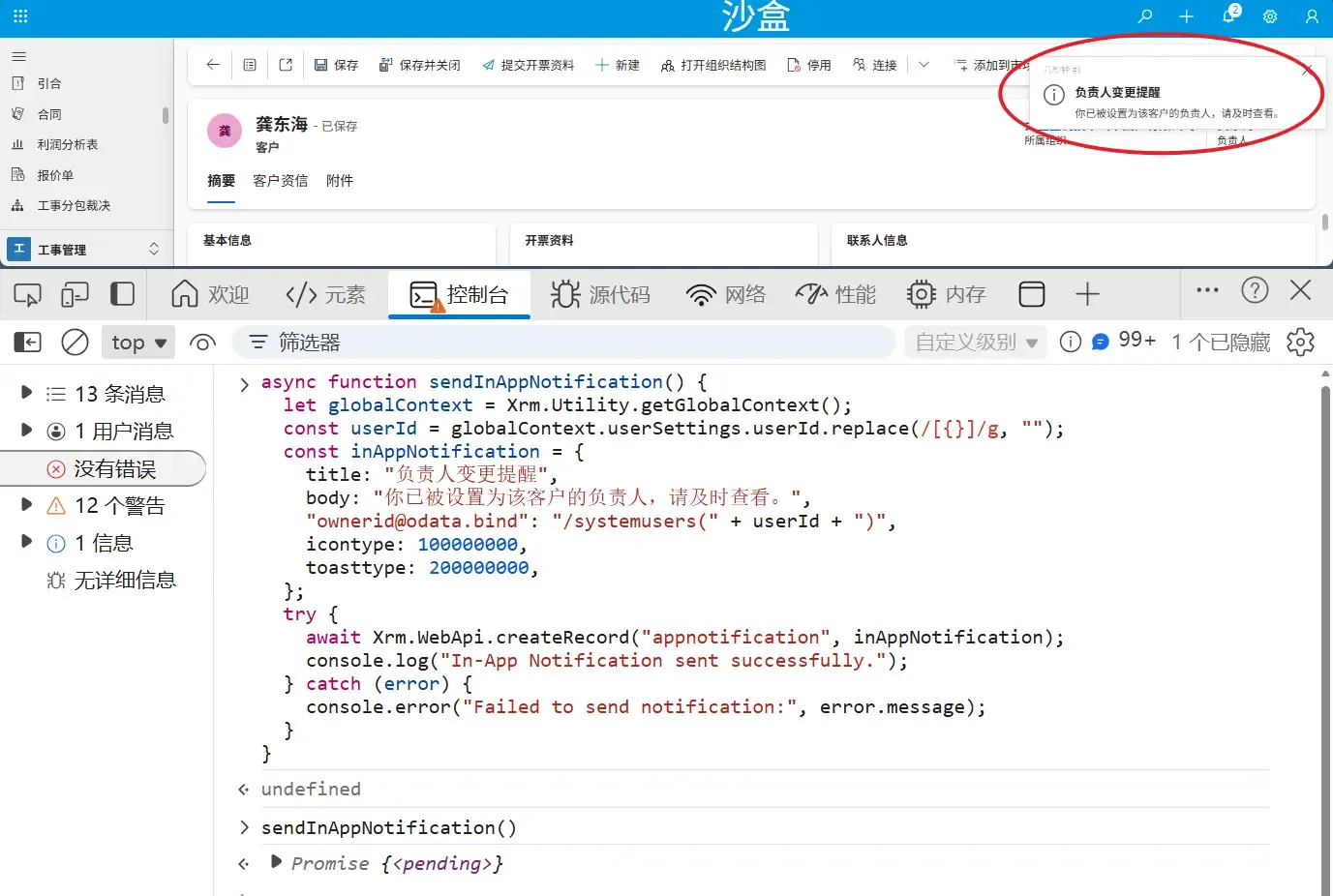
如果希望在表单、按钮或前端逻辑中即时发送消息提醒,Client API 会更加灵活,下面的示例是通过 Xrm.WebApi.createRecord 直接创建消息提醒
async function sendInAppNotification() {
  let globalContext = Xrm.Utility.getGlobalContext();
  const userId = globalContext.userSettings.userId.replace(/[{}]/g, "");
  const inAppNotification = {
    title: "负责人变更提醒",
    body: "你已被设置为该客户的负责人,请及时查看。",
    "ownerid@odata.bind": "/systemusers(" + userId + ")",
    icontype: 100000000,
    toasttype: 200000000,
  };
  try {
    await Xrm.WebApi.createRecord("appnotification", inAppNotification);
    console.log("In-App Notification sent successfully.");
  } catch (error) {
    console.error("Failed to send notification:", error.message);
  }
}
(补充说明)Icon Type选项
| Icon Type | Value |
|---|---|
| Info | 100000000 |
| Success | 100000001 |
| Failure | 100000002 |
| Warning | 100000003 |
| Mention | 100000004 |
推送方式三:Csharp(C#)
代码如下:
/// <summary>
/// Example of SendAppNotification with formatted content
/// </summary>
/// <param name="service">Authenticated client implementing the IOrganizationService interface</param>
/// <param name="userId">The Id of the user to send the notification to.</param>
/// <returns>The app notification id</returns>
public static Guid SendAppNotificationWithFormattedContent(IOrganizationService service, Guid userId)
{

    var request = new OrganizationRequest()
    {
        RequestName = "SendAppNotification",
        Parameters = new ParameterCollection
        {
            ["Title"] = "Complete overhaul required (sample)",
            ["Recipient"] = new EntityReference("systemuser", userId),
            ["Body"] = "Maria Campbell mentioned you in a post.",
            ["IconType"] = new OptionSetValue(100000004), //mention
            ["OverrideContent"] = new Entity()
            {
                Attributes =
                {
                    ["title"] = "[Complete overhaul required (sample)](?pagetype=entityrecord&etn=incident&id=0a9f62a8-90df-e311-9565-a45d36fc5fe8)",
                    ["body"] = "[Maria Campbell](?pagetype=entityrecord&etn=contact&id=43m770h2-6567-ebm1-ob2b-000d3ac3kd6c) mentioned you in a post: _\"**[@Paul](?pagetype=entityrecord&etn=contact&id=03f770b2-6567-eb11-bb2b-000d3ac2be4d)** we need to prioritize this overdue case, [@Robert](?pagetype=entityrecord&etn=contact&id=73f970b2-6567-eb11-bb2b-000d3ac2se4h) will work with you to engage with engineering team ASAP.\"_"
                }
            }
        }
    };

    OrganizationResponse response = service.Execute(request);
    return (Guid)response.Results["NotificationId"];
}
参考
(完)
如果这篇文章刚好帮到了你,欢迎请我喝杯咖啡!